
This guide will take you through the deployment of Contember from your GitHub repository to the Contember Cloud.
Before you start
You should have a project in a GitHub repository - complete quickstart tutorial or use one of our ready-made starter-kits.
Setup automatic deployment to Contember Cloud after push to GitHub using GitHub Actions.
1. Create Contember DSN
You need to get Contember DSN which specifies which project to deploy to and includes secret token. In Contember Cloud console on your project's page click a "Create new deploy token" button. You will get a deploy command, but we will need only the part after the deploy word - starting with contember://. It should look like this:
contember://example:4faef77592845fbeaf390c5e86989b1ea493e5d0@example.eu.contember.cloud2. Create repository secret
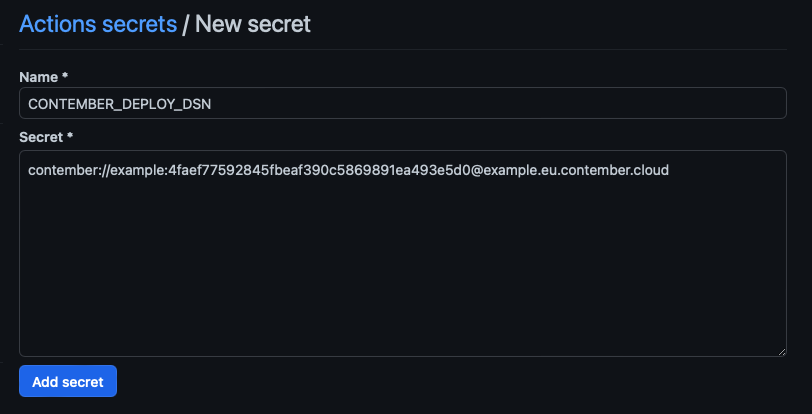
On GitHub go to your repository settings and select Security → Secrets → Actions. Click on "New repository secret" button, name your new secret CONTEMBER_DEPLOY_DSN and input the Contember DSN you got from Cloud Console.
3. Commit workflow file
After you created the repository secret, you can create a workflow that will run after each push to main branch. Create file .github/workflows/deploy.yml with following contents.
name: Deploy

on:
  push:
    branches: [ main ]

jobs:
  build:
    runs-on: ubuntu-latest

    steps:
    - name: Checkout
      uses: actions/checkout@v3

    - name: Install dependencies
      run: npm ci

    - name: Build and deploy Contember to production
      run: npm run deploy ${{ secrets.CONTEMBER_DEPLOY_DSN }} -- --yes
Now, when you push to main branch, your code should be automatically deployed to Contember Cloud.
Troubleshooting
If you encounter a problem, feel free to open an issue on GitHub or ask us in our Discord server. Don't forget to attach screenshots and terminal output.